In the previous article, I wrote about the usage of prompt package to set the project name for your create-next-app.
In this article, I will explain lines 265–274 in index.ts
// if there is no projectPath provided
// ie., no name is set for your next project
// this is how it is handled
if (!projectPath) {
    console.log(
      '\nPlease specify the project directory:\n' +
        `  ${cyan(program.name())} ${green('<project-directory>')}\n` +
        'For example:\n' +
        `  ${cyan(program.name())} ${green('my-next-app')}\n\n` +
        `Run ${cyan(`${program.name()} --help`)} to see all options.`
    )
    process.exit(1)
  }
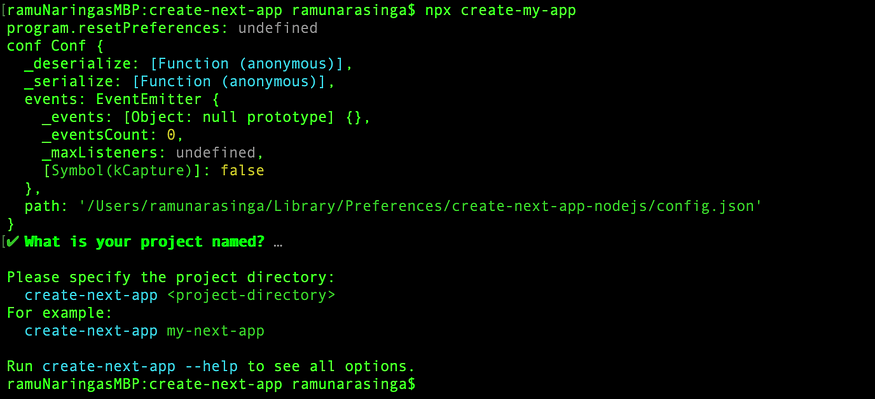
But for the above logs to appear, I had to comment the initial set to my-app like below:
 const res = await prompts({
      // onPromptState is a function available at
      // https://github.com/vercel/next.js/blob/canary/packages/create-next-app/index.ts#L25
      onState: onPromptState,
      type: 'text',
      name: 'path',
      message: 'What is your project named?',
      // initial: 'my-app',
      // validates ensures to follow npm package name guidelines
      // availabe here: https://www.npmjs.com/package/validate-npm-package-name
      validate: (name) => {
        const validation = validateNpmName(path.basename(path.resolve(name)))
        if (validation.valid) {
          return true
        }
        return 'Invalid project name: ' + validation.problems[0]
      },
    })
initial: ‘my-app’ is commented
Log with commented initial: ‘my-app’
Now, I will show you what it is like without commented initial: ‘my-app’
if (!projectPath) {
    // Read more about prompts here:
    // https://www.npmjs.com/package/prompts
    const res = await prompts({
      // onPromptState is a function available at
      // https://github.com/vercel/next.js/blob/canary/packages/create-next-app/index.ts#L25
      onState: onPromptState,
      type: 'text',
      name: 'path',
      message: 'What is your project named?',
      initial: 'my-app',
      // validates ensures to follow npm package name guidelines
      // availabe here: https://www.npmjs.com/package/validate-npm-package-name
      validate: (name) => {
        const validation = validateNpmName(path.basename(path.resolve(name)))
        if (validation.valid) {
          return true
        }
        return 'Invalid project name: ' + validation.problems[0]
      },
    })
Build the project and run npx create-my-app
If you do not enter a name for next project, it defaults to my-app.
This makes me wonder if it is worth to have that projectPath null safeguard described above when it always defaults to my-app unless initial is not set. May be I should create a pull request for this? idk.