I do remember seeing “degit” mentioned in one of the Readmes in the open source, but I could not recall which repository it was so I googled what a degit means and found this degit npm package.
In simple terms, You can use degit to quickly make a copy of a Github repository by only downloading the latest commit
instead of the entire git history.
You can use this degit package to download repos from Gitlab or Bitbucket as well so its not just limited to Github repositories.
# download from GitLabdegit gitlab:user/repo# download from BitBucketdegit bitbucket:user/repodegit user/repo# these commands are equivalentdegit github:user/repo
# Build a simple degit function inspired by Remotion’s degit file
To understand how to build a simple degit function, let’s break down the code from Remotion’s degit.ts file. This file implements a basic version of what the degit npm package does: fetching a GitHub repository’s latest state without downloading the full history.
import https from 'https';import fs from 'node:fs';import {tmpdir} from 'node:os';import path from 'node:path';import tar from 'tar';import {mkdirp} from './mkdirp';
https: Used to make a network request to fetch the repository.
fs: Interacts with the file system, such as writing the downloaded files.
tmpdir: Provides the system’s temporary directory path.
path: Handles and transforms file paths.
tar: Extracts the contents of the tarball (compressed file).
mkdirp: A helper function to create directories recursively, provided in a separate file.
export function fetch(url: string, dest: string) { return new Promise<void>((resolve, reject) => { https.get(url, (response) => { const code = response.statusCode as number; if (code >= 400) { reject( new Error( `Network request to ${url} failed with code ${code} (${response.statusMessage})`, ), ); } else if (code >= 300) { fetch(response.headers.location as string, dest) .then(resolve) .catch(reject); } else { response .pipe(fs.createWriteStream(dest)) .on('finish', () => resolve()) .on('error', reject); } }).on('error', reject); });}
URL Handling: The function checks if the request is successful (status codes below 300). If it’s a redirect (codes between 300 and 399), it follows the new URL. If it’s an error (codes 400+), it rejects the promise.
File Saving: The repository is downloaded and saved to the dest path using fs.createWriteStream.
Hey, my name is Ramu Narasinga. I study large open-source projects and create content about their codebase architecture and best practices, sharing it through articles, videos.

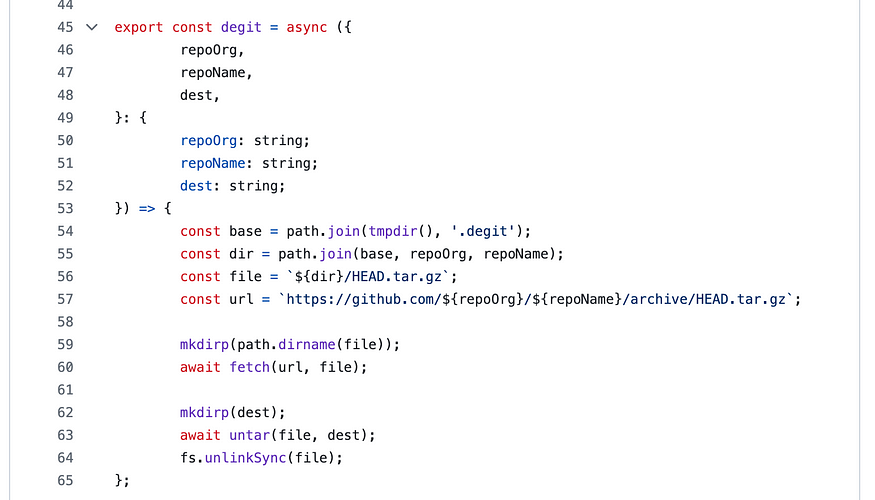
 # Build a simple degit function inspired by Remotion’s degit file