.git-blame-ignore-revs to ignore bulk formatting changes.
.git-blame-ignore-revs is a Git feature introduced in version 2.23 that allows you to ignore specific commits in git blame results. This is particularly useful for bulk commits that change a large number of lines without altering the actual functionality of the code, such as formatting changes, renaming, or applying coding standards across a codebase. By ignoring these non-functional changes, git blame can focus on meaningful edits that explain the context and reasoning behind the code.
When you use git blame on a file, it shows you which commit last changed each line of the file, along with the author and timestamp. This is useful for tracking down why a particular line was changed. However, if a large commit that makes purely formatting changes, like applying prettier, is part of the history, git blame may point to that commit for many lines. This make it difficult to find the actual functional change history.
For example, if your team uses a tool like Prettier or ESLint to reformat the entire codebase, the resulting commit might touch thousands of lines of code. Without .git-blame-ignore-revs, git blame would show this commit as responsible for every affected line, which could obscure the more meaningful history behind each line.
By using .git-blame-ignore-revs, you can tell git blame to skip over these commits and focus on the changes that matter.
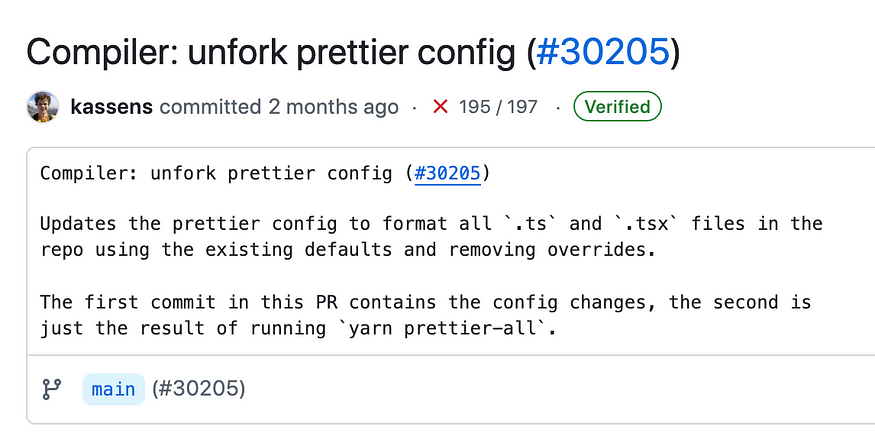
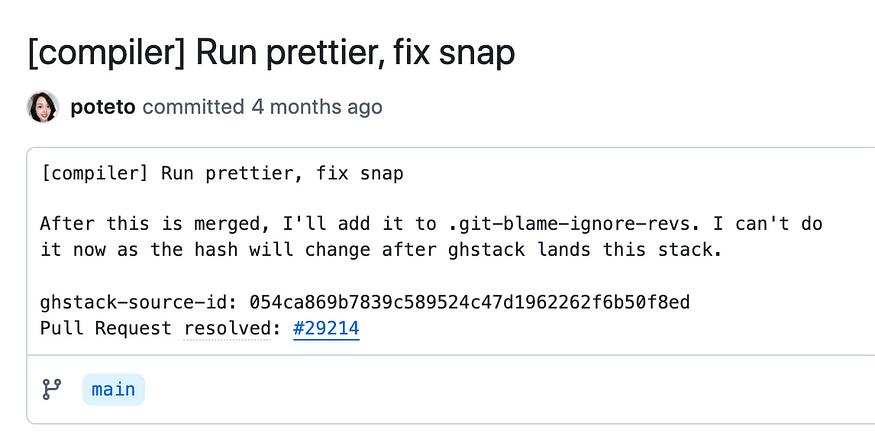
The React source code includes bulk commits where tools like Prettier were run across the entire project. Here are two such commits:
Commit:c998bb1
Message: [compiler] Run prettier, fix snap
This commit applies Prettier formatting across the codebase, altering many lines without changing the functionality.
2. Commit:fd2b3e1
Message: Compiler: Unfork prettier config
This commit contains further updates to the Prettier configuration, affecting all .ts and .tsx files in the repository.
These commits only deal with formatting and don’t provide meaningful context when investigating why a line of code was written the way it was.
To make git blame ignore these bulk formatting commits, we can create a .git-blame-ignore-revs file in the root of the repository.
Create the .git-blame-ignore-revs file:
touch .git-blame-ignore-revs
2. Add the relevant commit hashes to the file, explaining why each commit is being ignored. In this case, we’ll add the two commits we identified earlier:
3. Save the .git-blame-ignore-revs file in the repository. This file can be versioned alongside your code, allowing the entire team to use the same list of ignored commits.
To avoid typing the --ignore-revs-file option every time you use git blame, you can configure Git to automatically use the .git-blame-ignore-revs file.
This output indicates that the last change to lines 1 and 3 was due to the Prettier formatting commit (c998bb1e), and lines 2 and 4 were modified in another bulk commit (fd2b3e13). Since these are formatting changes, this is not helpful for understanding who introduced the actual logic behind these lines.
After configuring .git-blame-ignore-revs, running git blame will skip the bulk commits and show the real history:
Now, git blame attributes the lines to the correct commits, ignoring the unimportant formatting changes. This gives us useful information, showing who made the actual functional changes.
The .git-blame-ignore-revs feature in Git 2.23 is a game-changer for projects with bulk formatting or style changes. By setting up a .git-blame-ignore-revs file and configuring your repository, you can apply coding standards, run tools like Prettier, or refactor code without worrying about polluting the blame history.
With this approach, your team can confidently improve code quality and formatting without sacrificing the ability to track meaningful changes, ensuring that git blame remains a valuable tool for understanding the history and reasoning behind each line of code.