
Cac — Command And Conquer, a JavaScript library for building CLI apps.
In this article, we will review cac — command and conquer, a JavaScript library for building cli apps.
-
What is cac package?
-
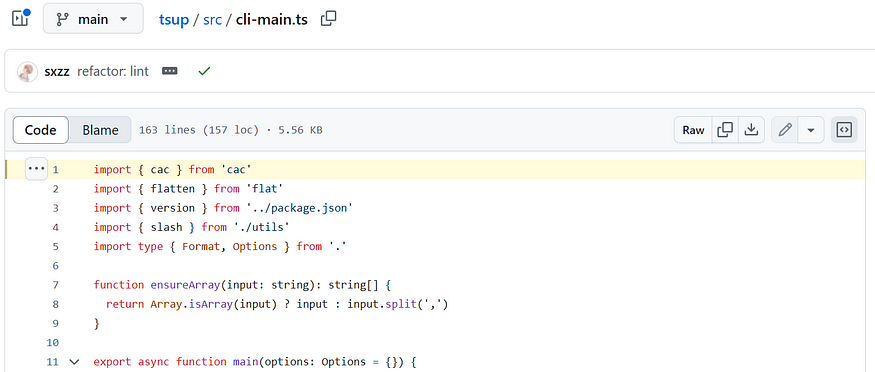
cac usage in Tsup.
What is cac package?
Command and conquer is a JavaScript library for building cli apps.
Features
-
Super light-weight: No dependency, just a single file.
-
Easy to learn. There’re only 4 APIs you need to learn for building simple CLIs:
cli.optioncli.versioncli.helpcli.parse. -
Yet so powerful. Enable features like default command, git-like subcommands, validation for required arguments and options, variadic arguments, dot-nested options, automated help message generation and so on.
-
Developer friendly. Written in TypeScript.
learn more about cac package in the documentation.
Usage
Simple Parsing
Use CAC as simple argument parser:
// examples/basic-usage.js
const cli = require('cac')()

cli.option('--type <type>', 'Choose a project type', {
  default: 'node',
})

const parsed = cli.parse()

console.log(JSON.stringify(parsed, null, 2))
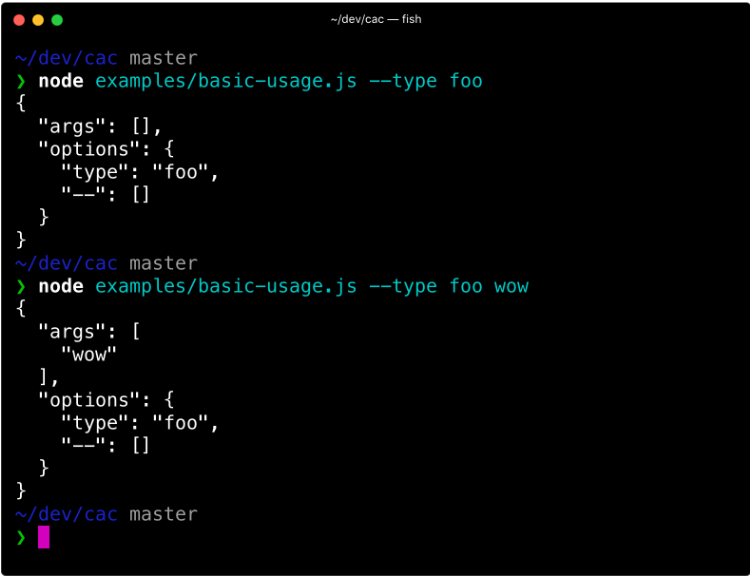
This example is picked from documentation.
cac usage in Tsup
- In a file named cli-main.ts in Tsup source code, cac is imported as shown below:
import { cac } from 'cac'
2. At line 12 in cli-main.ts, cac is initialised as shown below:
const cli = cac('tsup')
3. From line 18 to 102 options are configured. As you can see, there are lot of options available in this Tsup library.
 .option('--entry.* <file>', 'Use a key-value pair as entry files')
    .option('-d, --out-dir <dir>', 'Output directory', { default: 'dist' })
    .option('--format <format>', 'Bundle format, "cjs", "iife", "esm"', {
      default: 'cjs',
    })
    .option('--minify [terser]', 'Minify bundle')
    .option('--minify-whitespace', 'Minify whitespace')
    .option('--minify-identifiers', 'Minify identifiers')
    .option('--minify-syntax', 'Minify syntax')
    .option(
      '--keep-names',
      'Keep original function and class names in minified code',
    )
4. Below is the command configuration:
  .command('[...files]', 'Bundle files', {
      ignoreOptionDefaultValue: true,
    })
5. In the actions, all the arguments that you have passed are accessible via flags variable. options is updated with these flags as shown below
  .action(async (files: string[], flags) => {
      const { build } = await import('.')
      Object.assign(options, {
        ...flags,
      })
Most importantly, build function is called as shown below at line 154.
      }
      await build(options)
    })
About me:
Hey, my name is Ramu Narasinga. Email: ramu.narasinga@gmail.com
Tired of AI-generated code that works but nobody understands?
I spent 3+ years studying OSS codebases and wrote 350+ articles on what makes them production-grade. I built an open source tool that reviews your PR against your existing codebase patterns.
Your codebase. Your patterns. Enforced.