
How does Suna, an open source generalist AI agent, show tags as part of streaming response?
In this article, we review a code snippet in Suna codebase. Suna is an open-source generalist AI agent.
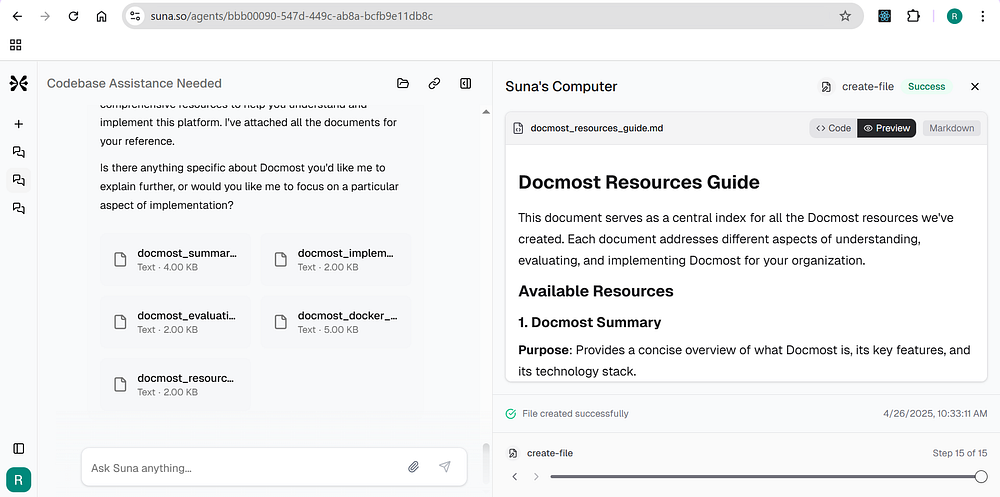

What are the tags?

As part of the response in the chat, you will see these tags like create-file, str-replace and when you click on these tags, respective information shows up on the right side.

This above image shows the information for str-replace tag
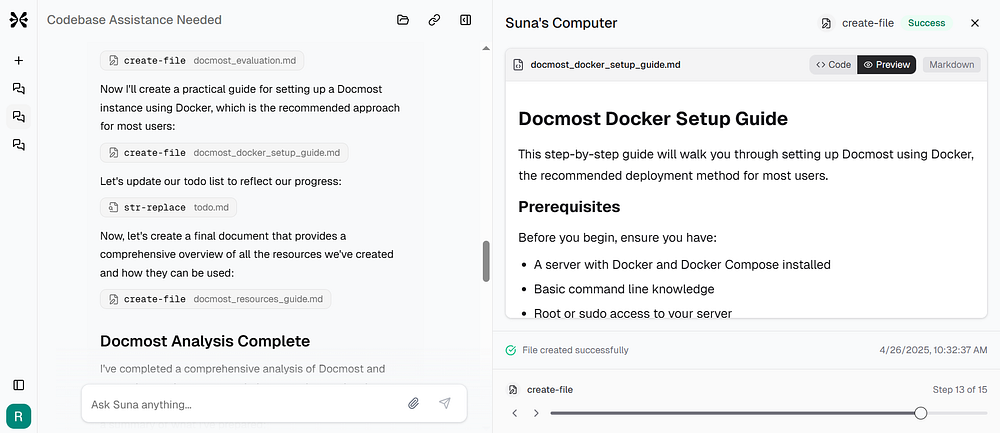
This above image shows content in the Suna’s computer when you click on the create-file tag.
Now that we understand what these tags are for, let’s review the code that renders these tags.
{(() => {
    let detectedTag: string | null = null;
    let tagStartIndex = -1;
    if (streamingText) {
        for (const tag of HIDE_STREAMING_XML_TAGS) {
            const openingTagPattern = `<${tag}`;
            const index = streamingText.indexOf(openingTagPattern);
            if (index !== -1) {
                detectedTag = tag;
                tagStartIndex = index;
                break;
            }
        }
    }

    const textToRender = streamingText || '';
    const textBeforeTag = detectedTag ? textToRender.substring(0, tagStartIndex) : textToRender;
    const showCursor = isStreamingText && !detectedTag;

    return (
      <>
        {textBeforeTag && (
          <Markdown className="text-sm prose prose-sm dark:prose-invert chat-markdown max-w-none [&>:first-child]:mt-0 prose-headings:mt-3">{textBeforeTag}</Markdown>
        )}
        {showCursor && (
          <span className="inline-block h-4 w-0.5 bg-primary ml-0.5 -mb-1 animate-pulse" />
        )}

        {detectedTag && (
          <div className="mt-2 mb-1">
            <button
              className="inline-flex items-center gap-1.5 py-1 px-2.5 text-xs font-medium text-primary bg-primary/10 hover:bg-primary/20 rounded-md transition-colors cursor-pointer border border-primary/20"
            >
              <CircleDashed className="h-3.5 w-3.5 text-primary flex-shrink-0 animate-spin animation-duration-2000" />
              <span className="font-mono text-xs text-primary">{detectedTag}</span>
            </button>
          </div>
        )}
      </>
    );
})()}
There are 3 flags here
-
textBeforeTag
-
showCursor
-
detectedTag
You have guessed it right, we are only interested in detectedTag.
<div className="mt-2 mb-1">
  <button
    className="inline-flex items-center gap-1.5 py-1 px-2.5 text-xs font-medium text-primary bg-primary/10 hover:bg-primary/20 rounded-md transition-colors cursor-pointer border border-primary/20"
  >
    <CircleDashed className="h-3.5 w-3.5 text-primary flex-shrink-0 animate-spin animation-duration-2000" />
    <span className="font-mono text-xs text-primary">{detectedTag}</span>
  </button>
</div>
I could not figure out how clicking a tag in the stream response updates the content in the right side tab under Suna’s computer though. I mean, if you look at this button, there is no onClick handler function.
About me:
Hey, my name is Ramu Narasinga. I study large open-source projects and create content about their codebase architecture and best practices, sharing it through articles, videos.
Want me to review your codebase architecture? book a meeting — https://thinkthroo.com/consultation/codebase-architecture-review
Business enquiries — ramu@thinkthroo.com
My Github — https://github.com/ramu-narasinga
My website — https://ramunarasinga.com
My Youtube channel — https://www.youtube.com/@ramu-narasinga
Learning platform — https://thinkthroo.com
Codebase Architecture — https://app.thinkthroo.com/architecture
Best practices — https://app.thinkthroo.com/best-practices
Production-grade projects — https://app.thinkthroo.com/production-grade-projects