
Next.js Codebase Analysis <> create-next-app <> index.ts explained — Part 1.7
In the previous article, we looked at projectPath. In this article, you will understand the code behind the name prompt you see when you create a new nextjs project.
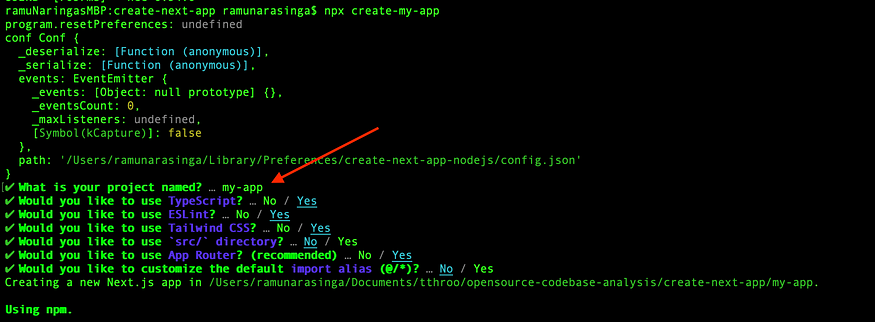
run() function checks if projectPath is set to choose a name for your project passed as part of command. For example, npx create-next-app my-app
But if you did not pass variable name, Commander does not set anything in action and you will be prompted to provide a name for your project.
The following code shows the prompt, I added the comments explaining what code does.
if (!projectPath) {
    // Read more about prompts here:
    // https://www.npmjs.com/package/prompts
    const res = await prompts({
      // onPromptState is a function available at
      // https://github.com/vercel/next.js/blob/canary/packages/create-next-app/index.ts#L25
      onState: onPromptState,
      type: 'text',
      name: 'path',
      message: 'What is your project named?',
      initial: 'my-app',
      // validates ensures to follow npm package name guidelines
      // availabe here: https://www.npmjs.com/package/validate-npm-package-name
      validate: (name) => {
        const validation = validateNpmName(path.basename(path.resolve(name)))
        if (validation.valid) {
          return true
        }
        return 'Invalid project name: ' + validation.problems[0]
      },
    })

    if (typeof res.path === 'string') {
      projectPath = res.path.trim()
    }
  }
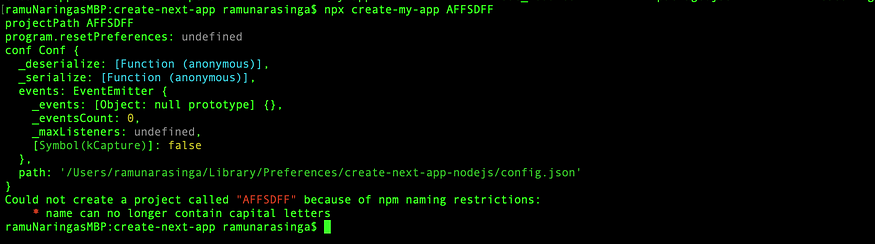
An example showing what happens when you try to name your project that does not conform to npm naming restrictions.

Conclusion:
prompts and validate-npm-package-name packages are used to take the user input for project name. Now you know how this name prompt works.
I am building a platform that explains best practices used in open source by elite programmers. Join the waitlist and I will send you the link to the tutorials once they are ready.
If you have any questions, feel free to reach out to me at ramu.narasinga@gmail.com
Get free courses inspired by the best practices used in open source.
About me:
Hey, my name is Ramu Narasinga. Email: ramu.narasinga@gmail.com
Tired of AI-generated code that works but nobody understands?
I spent 3+ years studying OSS codebases and wrote 350+ articles on what makes them production-grade. I built an open source tool that reviews your PR against your existing codebase patterns.
Your codebase. Your patterns. Enforced.