Blog
TypeDoc usage in @vercel/edge

TypeDoc usage in @vercel/edge

In this article, we analyze TypeDoc usage in @vercel/edge package.

I found a file named typedoc.json, got me wondering what’s TypeDoc and a quick google search helped me find TypeDoc website.

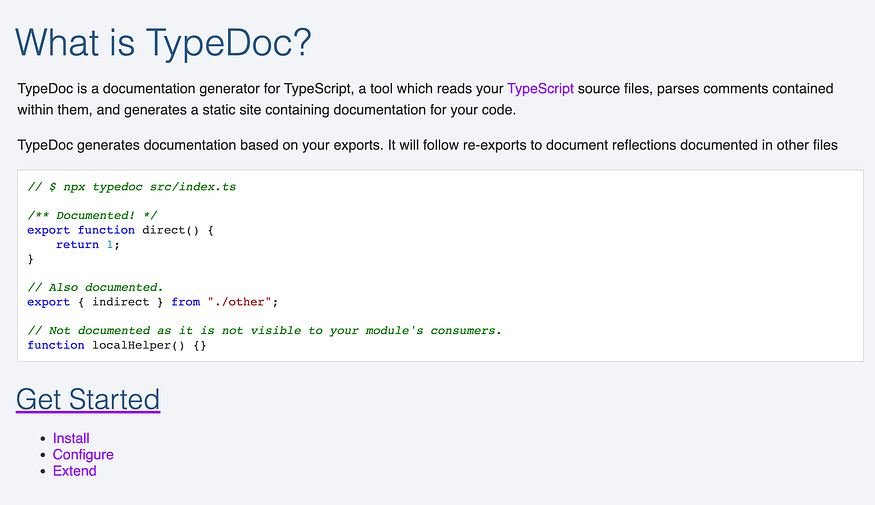
So what’s TypeDoc?

TypeDoc

TypeDoc converts comments in TypeScript source code into rendered HTML documentation or a JSON model. It is extensible and supports a variety of configurations. Available as a CLI or Node module.

TypeDoc documentation is comprehensive. Let’s now focus on how this is used in @vercel/edge.

typedoc.json configuration in @vercel/edge:

The below code is picked from packages/edge/typedoc.json.

{
 "$schema": "https://typedoc.org/schema.json",
 "entryPoints": ["src/index.ts"],
 "plugin": ["typedoc-plugin-markdown", "typedoc-plugin-mdn-links"],
 "out": "docs",
 "githubPages": false,
 "gitRevision": "main",
 "readme": "none",
 "hideBreadcrumbs": true
}

You require this configuration when you are using CLI to run TypeDoc.

Pay attention to “out” value, it is “docs”, it is a good thing that we have already docs generated for @vercel/edge package

ModifiedRequest interface:

Let’s pick ModifiedRequest interface found in middleware-helpers.ts

export interface ModifiedRequest {
 /**
 * If set, overwrites the incoming headers to the origin request.
 *
 * This is useful when you want to pass data between a Middleware and a
 * Serverless or Edge Function.
 *
 * @example
 * <caption>Add a `x-user-id` header and remove the `Authorization` header</caption>
 *
 * ```ts
 * import { rewrite } from '@vercel/edge';
 * export default async function middleware(request: Request): Promise<Response> {
 * const newHeaders = new Headers(request.headers);
 * newHeaders.set('x-user-id', 'user_123');
 * newHeaders.delete('authorization');
 * return rewrite(request.url, {
 * request: { headers: newHeaders }
 * })
 * }
 * ```
 */
 headers?: Headers;
}

This interface has a comment added that is picked by TypeDoc and is made available in docs at edge/docs/interfaces/ModifiedRequest.md

But what’s the command this package uses to initiate documentation generation? It can be found in package.json

"build:docs": "typedoc && node scripts/fix-links.js && prettier - write docs/**/*.md docs/*.md",

You can see prettier is applied on the docs folder.

About me:

Hey, my name is Ramu Narasinga. I study large open-source projects and create content about their codebase architecture and best practices, sharing it through articles, videos.

I am open to work on interesting projects. Send me an email at ramu.narasinga@gmail.com

My Github — https://github.com/ramu-narasinga

My website — https://ramunarasinga.com

My Youtube channel — https://www.youtube.com/@thinkthroo

Learning platform — https://thinkthroo.com

Codebase Architecture — https://app.thinkthroo.com/architecture

Best practices — https://app.thinkthroo.com/best-practices

Production-grade projects — https://app.thinkthroo.com/production-grade-projects

References:

  1. https://github.com/vercel/vercel/blob/main/packages/edge/typedoc.jso

  2. https://github.com/TypeStrong/typedoc

  3. https://typedoc.org/

  4. https://github.com/vercel/vercel/blob/main/packages/edge/docs

  5. https://github.com/vercel/vercel/blob/main/packages/edge/docs/interfaces/ModifiedRequest.md

  6. https://github.com/vercel/vercel/blob/main/packages/edge/src/middleware-helpers.ts#L1

We use cookies
We use cookies to ensure you get the best experience on our website. For more information on how we use cookies, please see our cookie policy.

By clicking "Accept", you agree to our use of cookies.

Learn more