shadcn-ui/ui codebase analysis-How does shadcn-ui CLI work? — Part 3.0
I wanted to find out how shadcn-ui CLI works. In this article, I discuss the code used to build the shadcn-ui/ui CLI.
In part 2.0 to 2.15, I discussed how npx shadcn-ui init works under the hood.
We will look at how npx shadcn-ui add <component> works in this part 3.x.
Since the packages/cli/src/commands/add.ts file is large, I will break this analysis down into parts and talk about code snippets and explain how stuff works.
export const add = new Command()
  .name("add")
  .description("add a component to your project")
  .argument("[components...]", "the components to add")
  .option("-y, --yes", "skip confirmation prompt.", true)
  .option("-o, --overwrite", "overwrite existing files.", false)
  .option(
    "-c, --cwd <cwd>",
    "the working directory. defaults to the current directory.",
    process.cwd()
  )
  .option("-a, --all", "add all available components", false)
  .option("-p, --path <path>", "the path to add the component to.")
  .action(async (components, opts) => {
    try {
      const options = addOptionsSchema.parse({
        components,
        ...opts,
      })
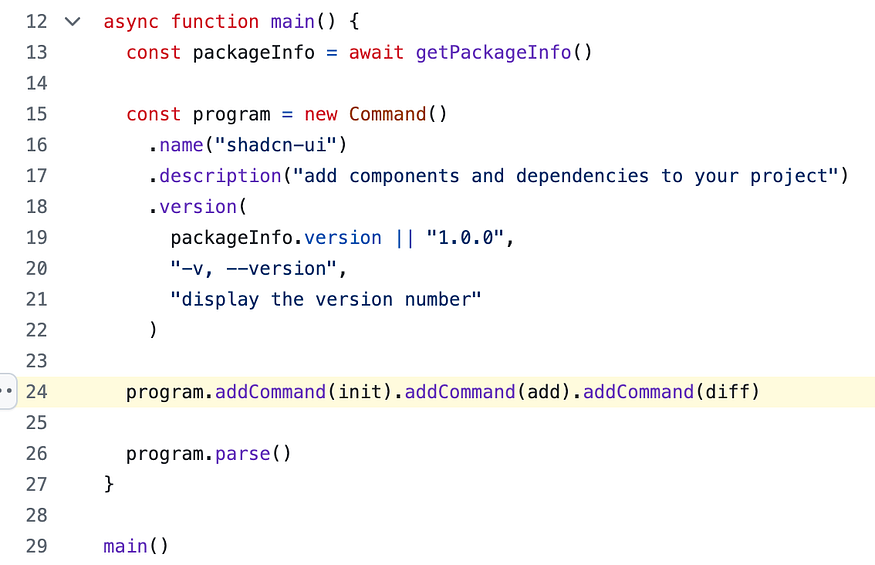
The way add command is registered is that, if you open this src/commands/index.ts in a new tab, you will find this code as shown below
Commands are created separately in the folder named commands for maintainability purposes. If you were to fork this shadcn-ui/ui repo and want to add your own command, this is one way to do it.
You also have options that go with your add command as shown below:
.option("-y, --yes", "skip confirmation prompt.", true).option("-o, --overwrite", "overwrite existing files.", false).option( "-c, --cwd <cwd>", "the working directory. defaults to the current directory.", process.cwd()).option("-a, --all", "add all available components", false).option("-p, --path <path>", "the path to add the component to.")
In Part 2.0 to 2.15, I discussed how npx shadcn-ui init works under the hood. It is time for a version bump to my articles. In 3.x articles, I will write about how npx shadcn-ui add works under the hood. Please note that semver is not applicable to my articles lol.
Command is imported from commander.js, a complete solution for node.js command-line interfaces. The way add command is registered with npx shadcn-ui CLI is that, if you open this src/commands/index.ts in a new tab, you will find this code as shown below:
There’s an argument that accepts a single component name or an array of component names, that is why you would write something like npx shadcn-ui add Button
Buttonhere is an argument. add command also has few options such -y, -o, -c, -a, -p. Read more about these in the shadcn-ui CLI documentation.
addOptionsSchema ensures that arguments and the options passed to the add command are valid using zod
Hey, my name is Ramu Narasinga. I study large open-source projects and create content about their codebase architecture and best practices, sharing it through articles, videos.