Blog
Lessons from opensource: Log “new version is available” to your CLI

Lessons from opensource: Log “new version is available” to your CLI

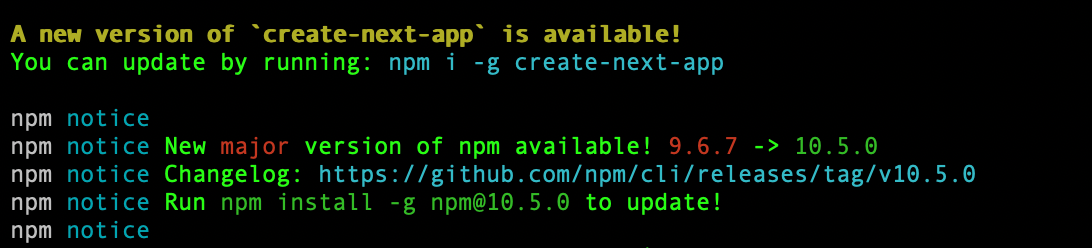
These lessons are picked from next.js/create-next-app open source code. In this article, you will learn how the CLI logs that a new version of create-next-app is available when there is a new version released.

// The following code snippet is from: 
// https://github.com/vercel/next.js/blob/canary/packages/create-next-app/index.ts#L473

import checkForUpdate from 'update-check'

const update = checkForUpdate(packageJson).catch(() => null)

async function notifyUpdate(): Promise<void> {
  try {
    const res = await update
    if (res?.latest) {
      const updateMessage =
        packageManager === 'yarn'
          ? 'yarn global add create-next-app'
          : packageManager === 'pnpm'
          ? 'pnpm add -g create-next-app'
          : packageManager === 'bun'
          ? 'bun add -g create-next-app'
          : 'npm i -g create-next-app'

      console.log(
        yellow(bold('A new version of `create-next-app` is available!')) +
          '\n' +
          'You can update by running: ' +
          cyan(updateMessage) +
          '\n'
      )
    }
    process.exit()
  } catch {
    // ignore error
  }
}

Subscribe to my newsletter to get more lessons from opensource.

update-check is an npm package, If there’s a new update available, the package will return the content of latest version’s package.json file. Quite simple and powerful.

Conclusion:

Now you know how your CLI notifies whenever there is new release available for your globally installed packages.

If you are looking to improve/learn frontend, checkout my website: https://tthroo.com/ where I teach project based tutorials.

About me:

Hey, my name is Ramu Narasinga. I study large open-source projects and create content about their codebase architecture and best practices, sharing it through articles, videos.

I am open to work on interesting projects. Send me an email at ramu.narasinga@gmail.com

My Github —  https://github.com/ramu-narasinga

My website —  https://ramunarasinga.com

My Youtube channel —  https://www.youtube.com/@ramu-narasinga

Learning platform —  https://thinkthroo.com

Codebase Architecture —  https://app.thinkthroo.com/architecture

Best practices —  https://app.thinkthroo.com/best-practices

Production-grade projects —  https://app.thinkthroo.com/production-grade-projects

We use cookies
We use cookies to ensure you get the best experience on our website. For more information on how we use cookies, please see our cookie policy.

By clicking "Accept", you agree to our use of cookies.

Learn more
