2026February

AGENTS.md, a README.md for agents.

In this article, we review AGENTS.md file that is used by over 60k open-source projects. We will look at:

  1. What is AGENTS.md?

  2. .agents/skills folder.

  3. AGENTS.md in Lobechat (an example).

Press enter or click to view image in full size

What is AGENTS.md?

A simple, open format for guiding coding agents,
used by over 60k open-source projects.

Think of AGENTS.md as a README for agents: a dedicated, predictable place to provide the context and instructions to help AI coding agents work on your project.

# AGENTS.md
 
## Setup commands
- Install deps: `pnpm install`
- Start dev server: `pnpm dev`
- Run tests: `pnpm test`
 
## Code style
- TypeScript strict mode
- Single quotes, no semicolons
- Use functional patterns where possible

Why AGENTS.md?

README.md files are for humans: quick starts, project descriptions, and contribution guidelines.

AGENTS.md complements this by containing the extra, sometimes detailed context coding agents need: build steps, tests, and conventions that might clutter a README or aren’t relevant to human contributors.

We intentionally kept it separate to:

Give agents a clear, predictable place for instructions.

Keep READMEs concise and focused on human contributors.

Provide precise, agent-focused guidance that complements existing README and docs.

Rather than introducing another proprietary file, we chose a name and format that could work for anyone. If you’re building or using coding agents and find this helpful, feel free to adopt it.

I copied this above information from the agents.md.

.agents/skills folder.

Agent Skills are a lightweight, open format for extending AI agent capabilities with specialized knowledge and workflows.

At its core, a skill is a folder containing a SKILL.md file. This file includes metadata (name and description, at minimum) and instructions that tell an agent how to perform a specific task. Skills can also bundle scripts, templates, and reference materials.

my-skill/
├── SKILL.md          # Required: instructions + metadata
├── scripts/          # Optional: executable code
├── references/       # Optional: documentation
└── assets/           # Optional: templates, resources

How skills work

Skills use progressive disclosure to manage context efficiently:

  1. Discovery: At startup, agents load only the name and description of each available skill, just enough to know when it might be relevant.

  2. Activation: When a task matches a skill’s description, the agent reads the full SKILL.md instructions into context.

  3. Execution: The agent follows the instructions, optionally loading referenced files or executing bundled code as needed.

This approach keeps agents fast while giving them access to more context on demand.

Learn more about agent skills.

AGENTS.md in Lobechat

In the lobehub/AGENTS.md, it has the following sections defined:

  • Project Description

  • Tech Stack

  • Directory Structure

  • Development Workflow

  1. Git Workflow

  2. Package Management

  3. Code Style Guidelines

  4. Testing Strategy

  5. Type Checking

  6. i18n

  • Linear Issue Management

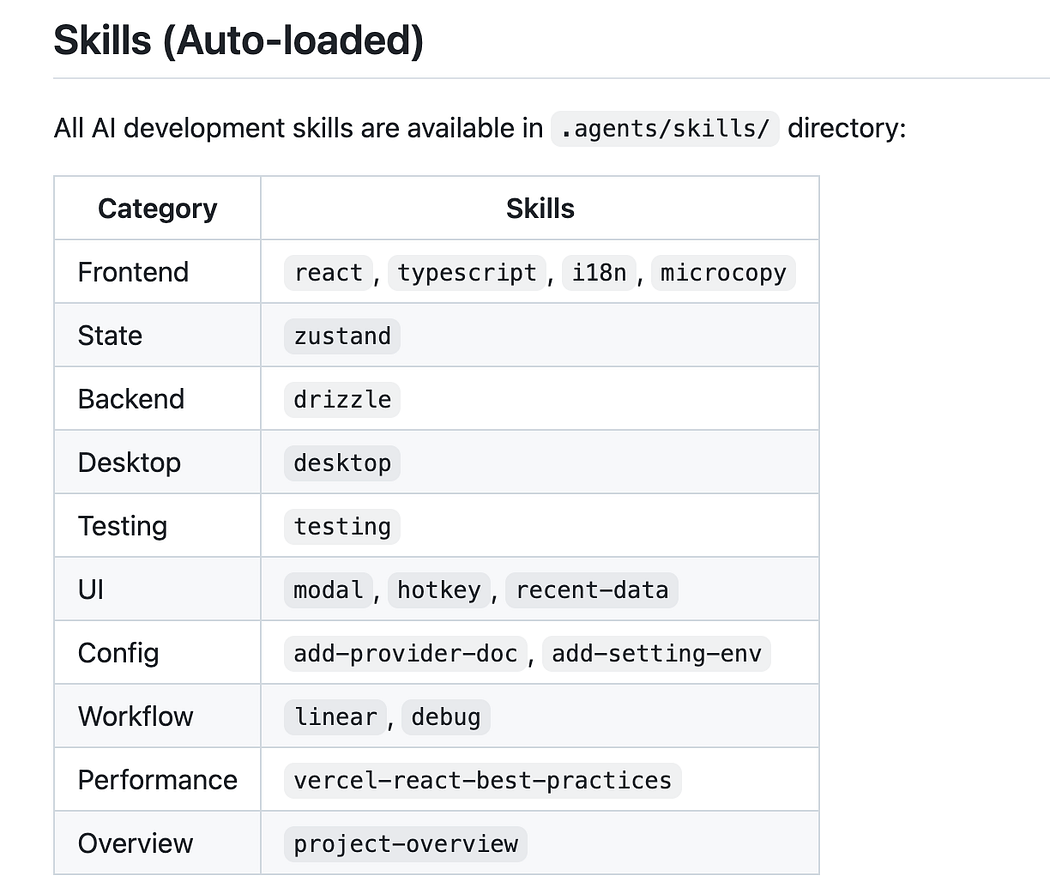
  • Skills (Auto-Loaded)

I would learn more about how skills are defined in the .agents folder

Press enter or click to view image in full size

Check out .agents/skills folder.

About me:

Hey, my name is Ramu Narasinga. I study codebase architecture in large open-source projects.

Email: ramu.narasinga@gmail.com

I spent 200+ hours analyzing Supabase, shadcn/ui, LobeChat. Found the patterns that separate AI slop from production code. Stop refactoring AI slop. Start with proven patterns. Check out production-grade projects at thinkthroo.com

References:

  1. https://agents.md/#examples

  2. https://agentskills.io/what-are-skills

  3. lobehub/lobehub/AGENTS.md